
Calendar and attendance

A training calendar, and attendance the coach takes on a phone

Trainings, matches and events of every group in one calendar — set up the regular trainings for the whole season on one screen. Members and parents answer the invitation, and the coach marks attendance with a swipe — even in a sports hall without a signal.

In all packages (carpool: Silver and above)

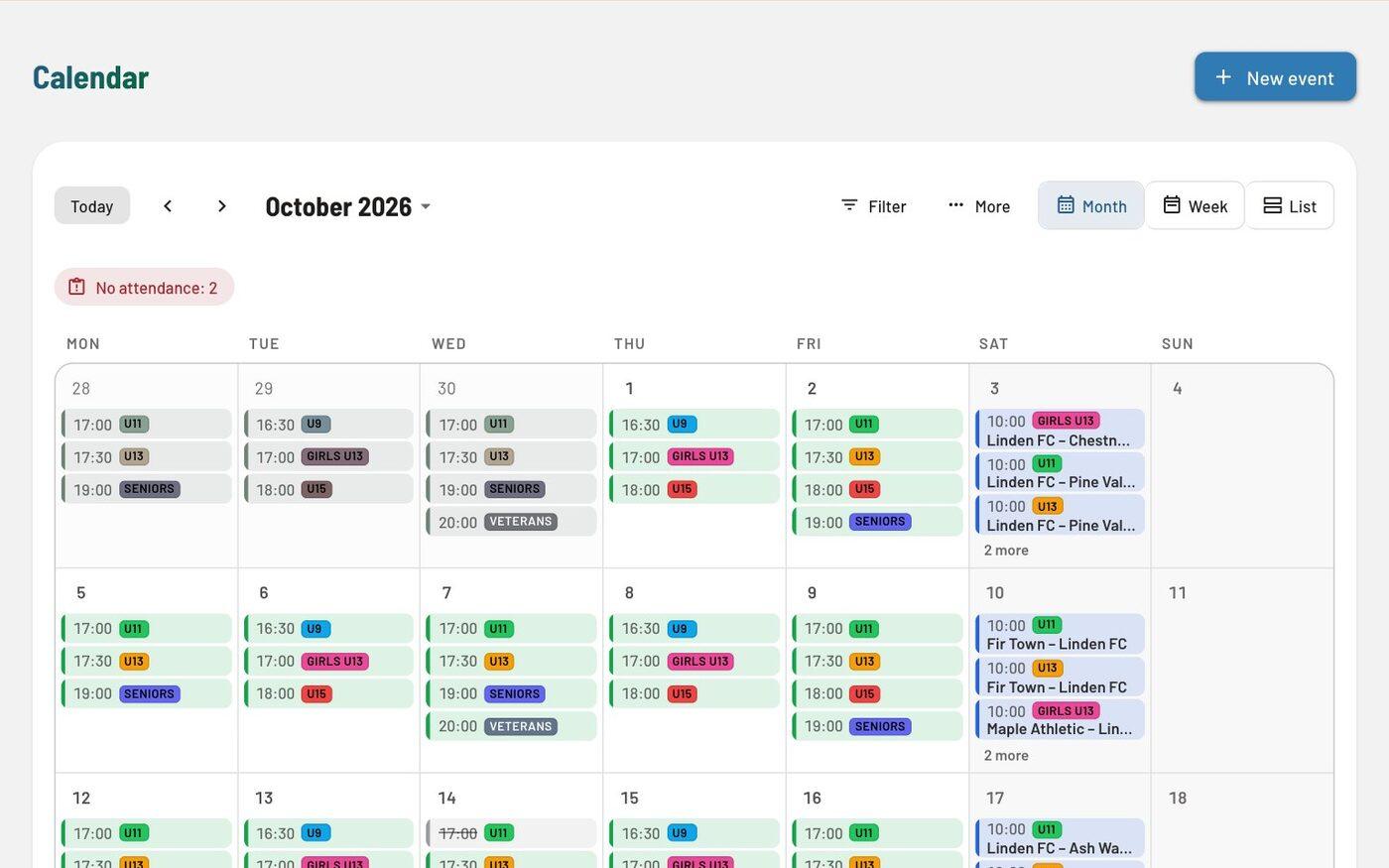
Month view of the calendar for October 2026 with trainings of the groups U9, U11, U13, U15, Girls U13 and Seniors and matches on Saturdays; each group has its own colour.
Month view: each group has its own colour.

At a glance

Season timetable

The regular trainings of every group on one screen: days, time, place and coach. A preview shows the new sessions, skipped holidays and overlaps, then one click creates every series up to the end of the season — it never duplicates existing trainings.
A calendar for the whole club

Month, week and list views (on a phone the week in three-day steps), recurring sessions on several weekdays, holidays and breaks, attachments and group colours.

Invitations and answers

Coming or Not coming — in Clubsman or straight from the e-mail. Invitations can go out by themselves at a chosen time before the event, with a reminder; when places are limited, “Coming” takes a free place.

Prisotnost SP for coaches

A separate app on the phone: the group’s list, “Everyone present” with undo, a note and — if the club allows it — a call or SMS to the parents, plus “Add training” for a missing session. Without a signal it saves the entry and sends it once the connection is back.

Matches and results

A “Match” section: opponent, home or away, competition and venue. Once it has started, the coach or the office enters the result or marks the match as postponed — the result shows straight away in the match header.

A change prepares a notice

When a session is cancelled or moved, Clubsman prepares a notice for the event’s groups, and for a training in the next 12 hours an SMS too. The event remembers that the group was told and shows how many have read the notice.

In detail

Calendar and attendance: everything it does

Events and sessions

  • Event types, locations and staff roles; the group’s staff is added by itself.
  • Cancel and restore a single session or a whole series.
  • “Season timetable” changes existing series from a chosen day (time, place, lead, weekdays) or ends them; sessions edited one by one and cancelled sessions stay as they are.
  • The club’s own holidays and breaks, which a series skips.
  • A warning when sessions of the same coach or group overlap.

Matches

  • Matches get a group — the group’s members see them in their own calendar.
  • Enter the result or mark a match as postponed or cancelled; you prepare the message to members yourself.

Attendance

  • The attendance list opens with the members of the event’s groups; guests are added separately.
  • “Attendance not entered” on the dashboard and reminders to coaches.
  • A warning if a member is marked before they joined or after they left the group.
  • Unsent marks in Prisotnost SP belong to the person who entered them — another coach on the same phone neither sees nor sends them.
  • Attendance in the member record and on the “My profile” page.

Substitutions and staff attendance

  • “I need a substitute”: the request goes to chosen colleagues, and the first to accept takes the place at the event.
  • Staff confirm their own presence at the event, on the “Today” card or in Prisotnost SP; coach pay takes it into account.
  • An overview of substitutions and staff attendance with export to Excel.

Public calendar and subscriptions

  • The club’s public calendar with a choice of group — no sign-in needed.
  • Subscribe in Google, Apple or Outlook calendar, and “Add to calendar” for a single event.
  • A personal calendar link you can revoke at any time.

Carpool (Silver package and above)

  • Offer and find a ride to an event, with free seats counted.
  • A parent offers or books a ride straight from the e-mail invitation.
  • One line on the event page: free seats, drivers, passengers and your ride; the other cars under “Show rides”.
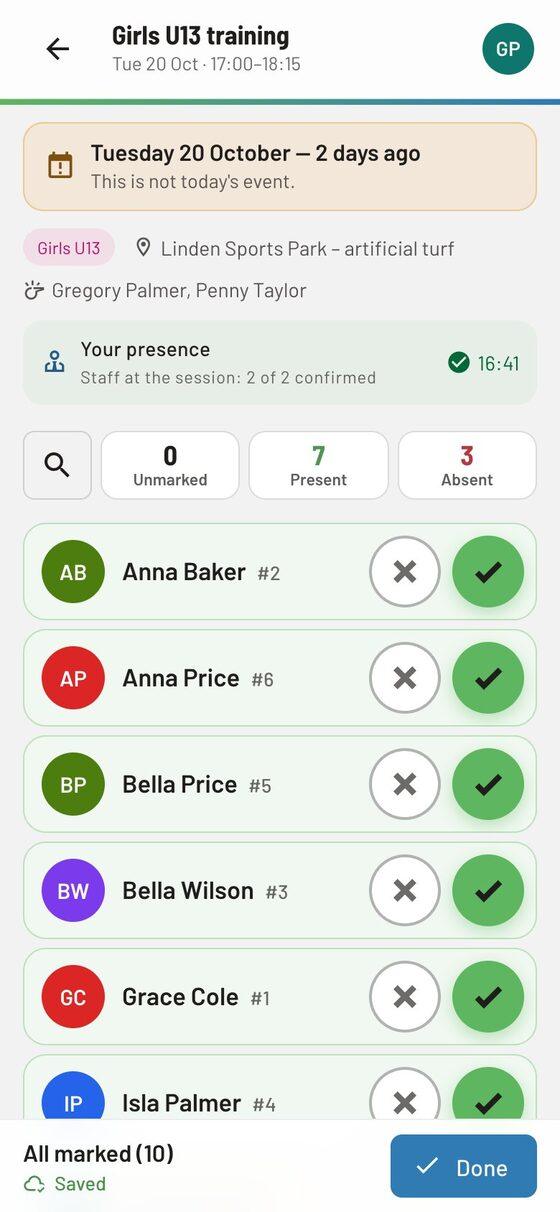
The Prisotnost SP attendance app on a phone: a U13 training, the list of players with present and absent buttons, the “Everyone present” button and the status “5 of 14 marked”.
Prisotnost SP: “Everyone present” and one tap for the exceptions.

What users say

Clubs’ experience

We got used to it quickly and can no longer imagine working without it.

Read the full review

Working with the portal has made keeping our records easier. We enter the timetable of trainings and matches, and attendance itself, into the portal as we go. That way coaches and club management have an up-to-date view of how well trainings are attended and in which hall they take place. They can follow everything on smartphones or computers. We then export attendance records by age group to Excel. We keep all the Excel tables on the computer, so we can’t mislay or lose them. The portal also calculates the attendance percentage of individual players at trainings. We enter every new player with all her details into the database. That way we have all contact details in one place. If a coach needs some information about a player, they can access it through the portal on a mobile phone. We handle all payments through the portal. We issue payments in batches. If age groups have a different monthly amount from the others, we mark it. Payment slips in PDF are made very quickly, and the portal then sends them with one click to all the parents’ e-mail addresses. If payment slips are not paid on time, we also send reminders through the portal with one click. They don’t need to be created again, as the regular payment turns into a reminder. Every player has her own username and password for the portal, where she can follow the trainings of her age group and her payment slips that are still unpaid. To sum up, the portal has shortened the time we spend creating payment slips and given us a clear view of payments, trainings and the player database. We got used to it quickly and can no longer imagine working without it.

Coach ŽOK Novo mesto Translated from Slovenian

The main advantage of the portal is that it saves you a great deal of office work.

Read the full review

At NK Mirna football club we first decided to try Spletni portal free of charge. Because we liked it a lot, we decided to buy a licence. The main advantage of the portal is that it saves you a great deal of office work. Payments and issuing payment slips are very clear. Coaches also have an easier job at training thanks to their quick mobile access to the portal, as they can check attendance quickly. We will certainly keep using the portal, as over a year it is cheaper than sending paper payment slips.

Urban Turk NK Mirna Translated from Slovenian

Questions

Frequently asked questions

Does Clubsman work on a phone?

Yes. It works in the browser on a computer, tablet and phone, and you install it on your phone as an app straight from the browser — no App Store or Google Play — and receive notifications on the device. For recording attendance coaches also have the Prisotnost SP attendance app, which works even without signal.

Which sports is it suitable for?

All of them. The calendar, attendance, enrolment, invoices and communication are the same for every sport. Training plans and the sketch board know 15 sport profiles (e.g. football, basketball, volleyball, handball, swimming); the Belts module is for martial arts.

Related

See how it works on a sample club

Try every feature in the trial environment with made-up data — as an administrator, coach, member or parent.