“Issue invoices” for a group
Who, what, when, check and issue. Members’ individual amounts and discounts are applied by themselves, and the quantity can come from attendance — or charge straight from the event page with “Invoice those present”.

Invoices, payments and reminders
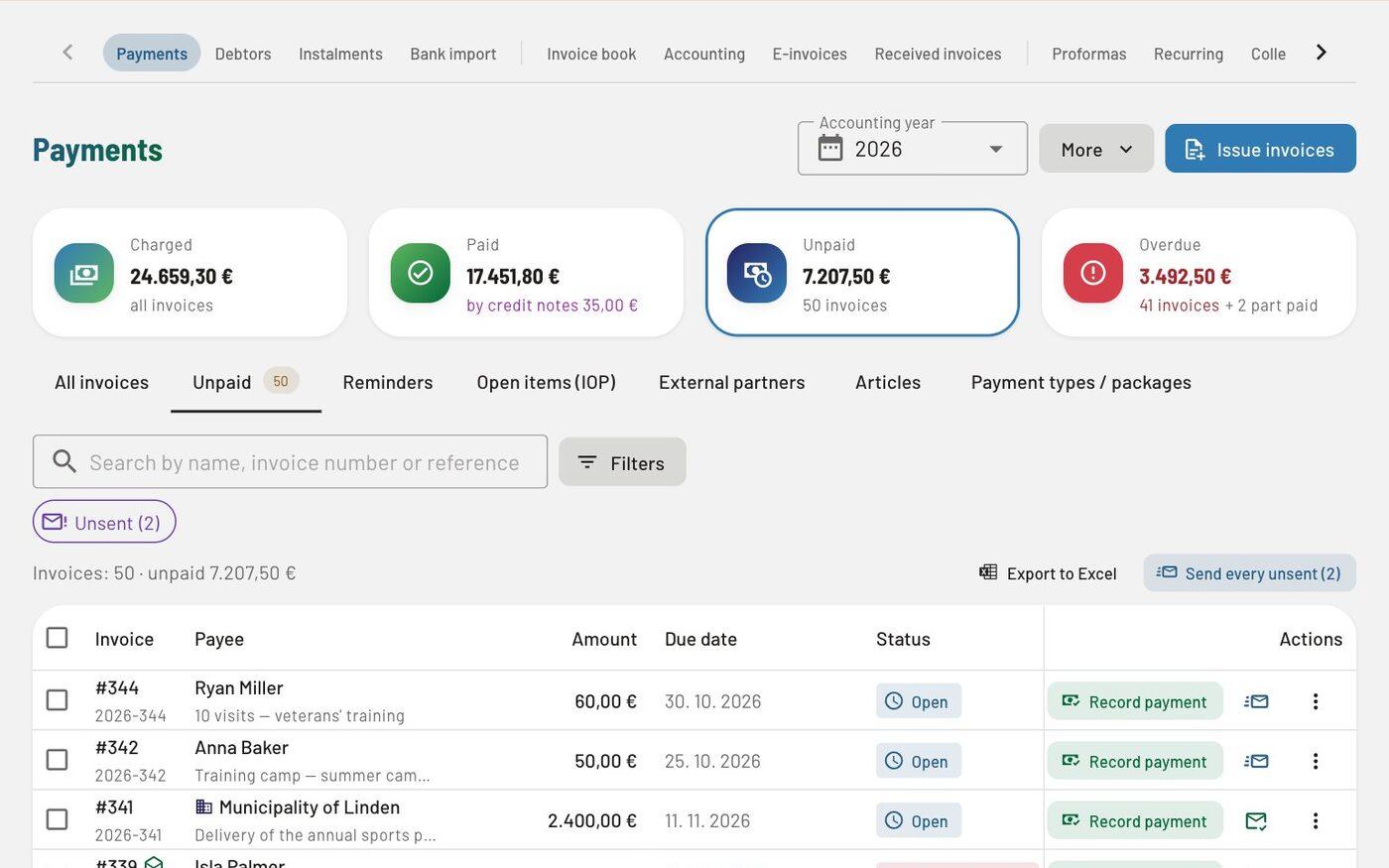
Issue the training fee for every group in a few steps. Each invoice carries a payment reference, payments are matched to invoices from the bank statement, and reminders go out on your schedule.
In all packages (card payments: Gold or add-on)
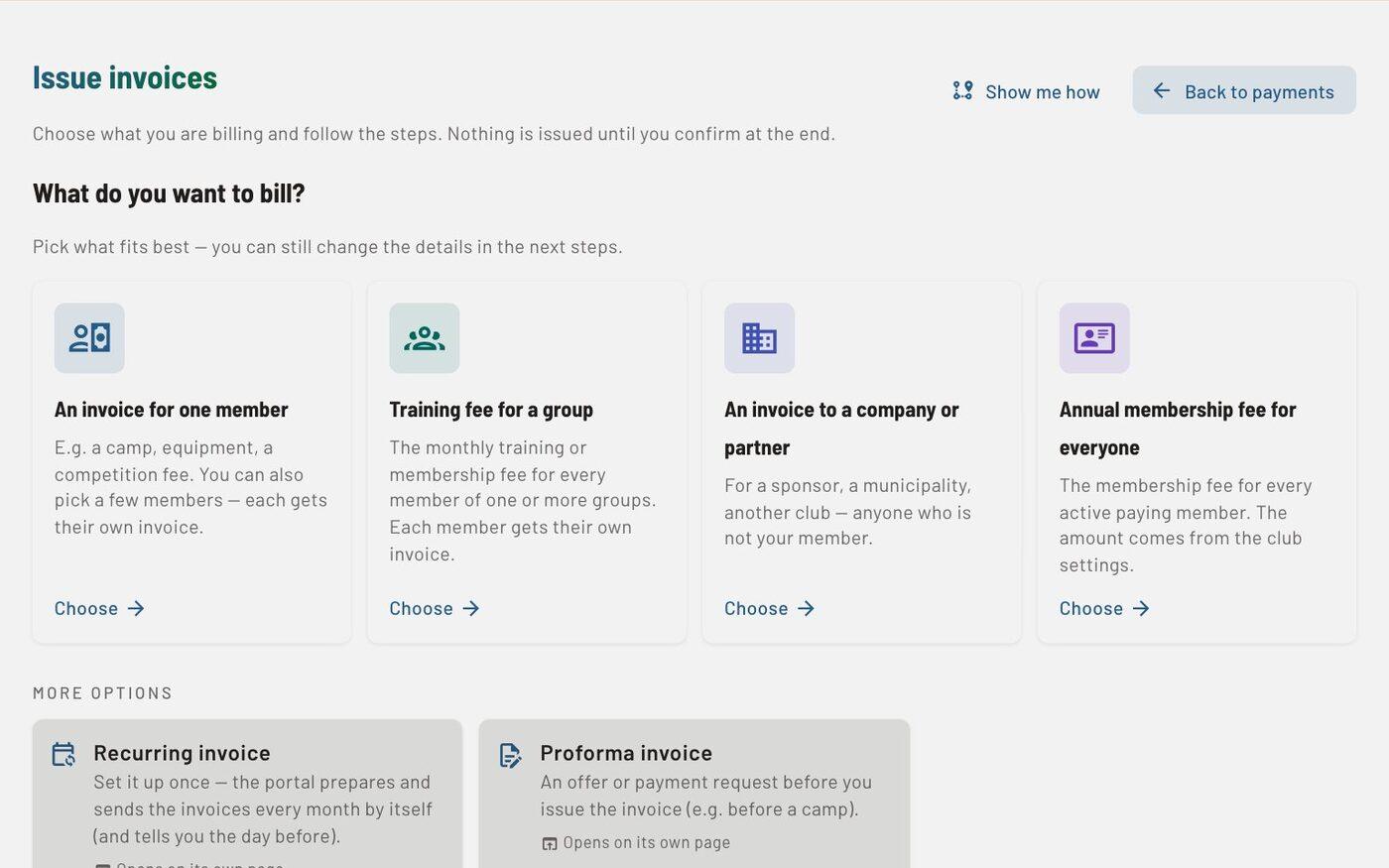
Who, what, when, check and issue. Members’ individual amounts and discounts are applied by themselves, and the quantity can come from attendance — or charge straight from the event page with “Invoice those present”.
The invoice arrives by e-mail with a PDF attached. With one “Pay all” order a parent settles every open invoice — for several children too.
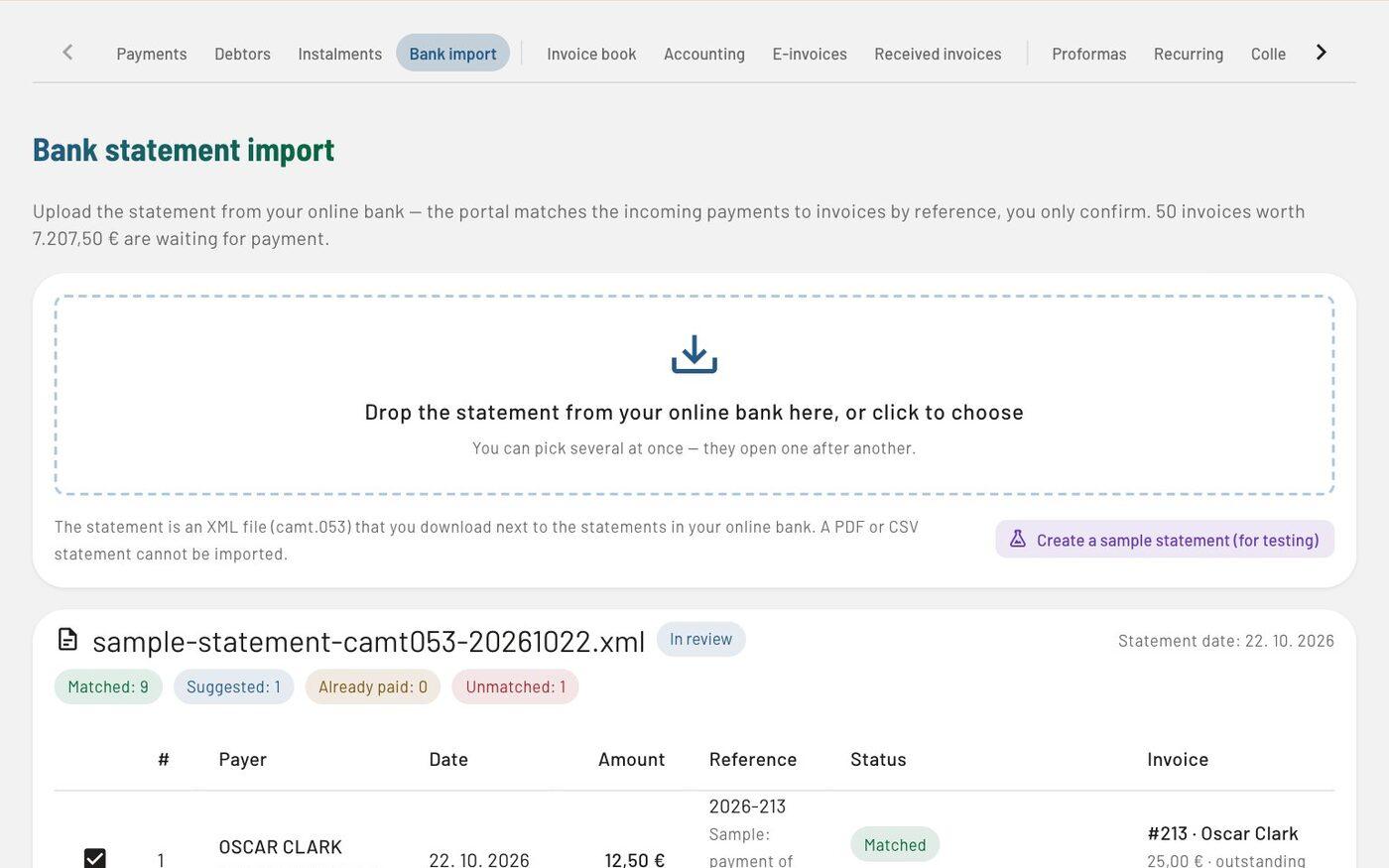
Importing a camt.053 statement matches payments to invoices by reference, records partial payments and moves overpayments to credit.
Automatic payment reminders in stages — the schedule in one sentence and the answer to “Who gets a reminder next”. Monthly invoices with a compulsory check before they are issued, also by each member’s basket, SEPA direct debit step by step, and payment in instalments.
In detail
What users say
There are far fewer non-payers than in the past.
When we heard about you before last season and had a quick look at ŽKD Maribor at how the payment-slip system works, we at OK Maribor quickly got in touch with Spletni portal too. You responded quickly, showed us how the portal works, and we decided straight away to work with you. For now we only use the portal for sending payment slips for training fees, and we are delighted with the system. There are far fewer non-payers than in the past. Parents have accepted the system well, and in future we will certainly use your other services too. Thank you — and we certainly recommend that clubs not yet using this portal get in touch with Spletni portal as soon as possible. We are staying loyal to it.
This way the club saves time, office supplies and postage.
We have been using Spletni portal at the club for a year and a half. For now we use it mostly for issuing monthly invoices for training fees, as doing this through the portal has proved the friendliest way for everyone: for the club, which issues invoices simply and quickly by e-mail and then follows payments and sends reminders to non-payers; for parents, who can see their payments at any moment by logging in to the portal; and for the accounts office, which gets the data through the portal. This way the club saves time, office supplies and postage. With your login you can go to the portal anywhere, on any computer. We keep our whole membership database in Spletni portal, and we also send notices to members through the portal. Our members, or their parents, also send messages to the club through the portal. I must also praise the portal team, which is extremely responsive and open to suggestions, takes the specifics of each club into account, fulfils our wishes very quickly and helps us when we get stuck somewhere. Unfortunately, at our club the portal somehow hasn’t caught on with the coaches, who could submit all their reports through the portal so that we would have everything stored in one place. We will keep working on that at our club. Otherwise the portal is great and we recommend it.
The portal is extremely useful, but what convinced us most is that its creators are open to every new suggestion and idea, and they put them into practice incredibly quickly.
At first we used Spletni portal for its extremely well-organised accounting system (sending payment slips, checking payments …), and later we started using the portal for all the administration we need in the club (messaging club members, entering trainings, checking attendance at trainings). The portal is extremely useful, but what convinced us most is that its creators are open to every new suggestion and idea, and they put them into practice incredibly quickly. I would recommend the portal to every sports club, as its creators can adapt certain features of the portal to an individual club and its needs. We look forward to further cooperation and shared challenges!
Questions
Yes. In the member record you add to the Basket what the member pays — articles with an agreed price, discount and quantity, for example the training fee with a family discount and equipment rental, also without SEPA direct debit. When issuing you choose “By each member’s basket”, once or automatically every month: everyone gets an invoice with their own lines, and anyone with an empty basket is left out and named in the notice before issue. A price change in the price list does not change the prices in the basket. Available in every plan.
Yes, at no extra cost. The Accountant role reads the invoice book, payments and reports, takes the Excel exports, enters received invoices and locks periods, but does not change issued invoices. An accountant working for several clubs switches between them without signing in again.
The club connects its own Stripe account and is the merchant itself: the money goes straight to the club’s account, and Stripe charges its fee to the club. By default Clubsman adds no fee of its own.
Related
Try every feature in the trial environment with made-up data — as an administrator, coach, member or parent.